
Automating Learning: Using Make with OpenAI and Trello
This week
This week persisted of balancing a lot of training in different areas, both within my personal life as well as my professional life, at work mainly focusing on EKS training as well as upskilling further in Terraform, and in my personal life learning more about Static Analysis within Reverse Engineering and how we can tie those skills into extracting data from executables and other files. Not only this, and actually the part I am most proud of, I managed to figure out a pipeline of sorts creating cards on Trello after prompting OpenAI for good references to a subject through an automation framework called Make.
Make
I recently faced a challenge while delving into Malware Analysis, seeking fresh resources to expand my knowledge repository. Despite my efforts, I found myself encountering the same courses and blog posts repeatedly. Reverse Engineering as a subject seems to be quite niche and I wanted a way to take what I had learned and generate more ideas based on that and keep track of those ideas which led me to realising the potential of automation frameworks.
Make is an automation Framework that provides a great visual way to create automation pipelines across various different elements including:
- OpenAI
- Trello
- Telegram
- Hubspot
In the past I have never considered reaching out to ChatGPT or similar to generate content ideas for studying, so I decided to send a prompt or two to see how it would respond and could see that it actually came back with results I was not able to find on Google or similar whilst also providing some anecdotal information for other resources. When I realised that Make actively supported sending prompts to OpenAI and returning the results to be used further down the pipeline, as well as interact with Trello, I jumped straight at the chance to action on it and created a simple “scenario”:
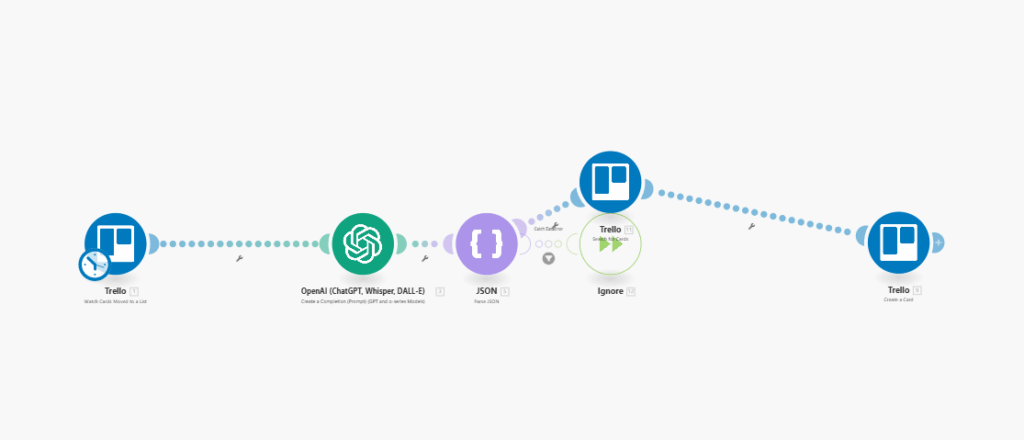
Now, whenever a card on the Trello board is moved into the Completed Column, it sends the following prompt to OpenAI:
"I just completed a task titled {{1.data.card.name}} and marked it as completed. My goal is to learn more about Reverse Engineering. Can you suggest a single area I should research based on my current progress in malware analysis?"


Respond ONLY in this format (no explanations, no extra text):
{
  "criteria_value": "Next learning task",
  "criteria_description": "Why this task is important."
}
Please provide Links to awesome resources as part of the Criteria Description.  Also this should be something new and could be semi related to the previous task, perhaps a carry on to get deeper into the topic. Also a few links would be even better to refer too!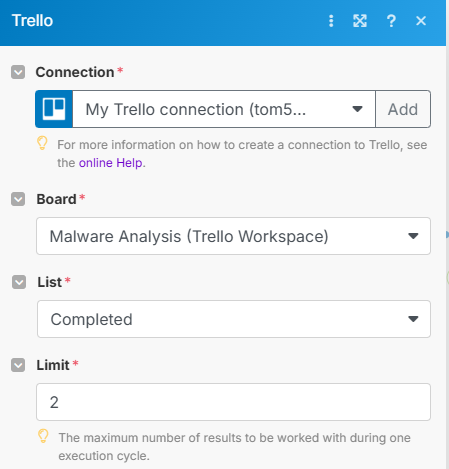
While the prompt COULD do with some tweaking here and there, this was a good way of retrieving a response from OpenAI and being able to hook that response and map to Trello by mapping the output variables made it super quick and clean enough to work with and expand on over time.
From the OpenAI response, we then parse out the Json to two different variables which we pass to the remaining two Trello Steps:
- Search for Card – Work in Progress
- Create Card
Search for Card is an attempt of me trying to expand the automation sequence here to try and perform extra validation that we are returning and creating a card that has not pre-existed or currently exists. I am hoping to keep working and expanding it over time to suit my needs.
Create Card takes the variables created from parsing the Json previously and maps them to Trello Fields for the card name, and card description:
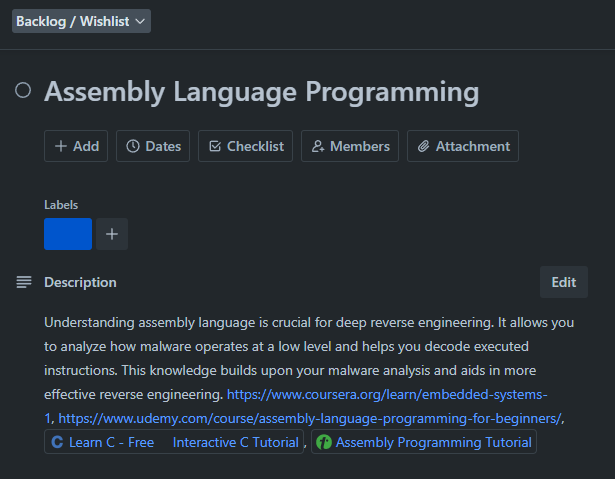
Overall, this may not be the most exciting or groundbreaking project in the world, but I am super happy I decided to dig into a mini-project like this, I sincerely hope that I am able to continue expanding it to make it more useful for my learning of Reverse Engineering, and Malware Analysis.
With all the above said and done, thank you for taking the time to read this today! We live in times where we have to keep in line with the current technologies and projects like this are a great way to keep our skills sharp!